Equip weapons, armor, and cosmetics to customize your avatar. The attachment system supports 25 slots across your entire body, from helmets to rings to a tail. Everything you equip is visible to other players in real time.
Equipment Regions
Smart Equipping
Click "Equip" on any item in your inventory, and the system automatically picks the correct slot based on the item type. No need to manually drag items to specific body parts. The system knows where a sword goes versus a helmet.
- Swords, staves, wands --> Right hand
- Shields, bows --> Left hand
- Necklaces, pendants --> Neck slot
- Helmets, hats --> Head slot
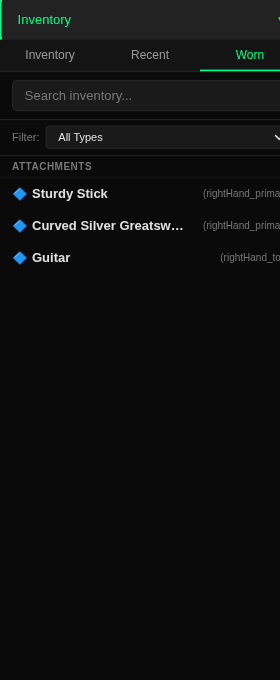
For players who want fine-grained control, you can override the default slot using the Attachment dropdown in the item inspector panel. This lets you place a weapon on your back sheath instead of in your hand, or wear a ring on a specific finger.
Weapon Types
Melee
- Swords
- Axes
- Daggers
- Greatswords
Ranged
- Bows
- Chakrams
Magic
- Staves
- Wands
- Orbs
Tools
- Fishing pole
- Trowel
- Watering can
Instruments
- Guitar
- Drumsticks
Cosmetics
- Amulets
- Pendants
- Fox tail
- Cell phone
Equipment and Combat
Weapons are not just cosmetic. They scale your combat damage based on your character's attributes. The type of weapon determines which attribute applies.
Multi-User Visibility
When you equip gear, every other player in your instance sees it on your avatar in real time. Swap a sword for a staff, and everyone nearby watches the change happen. Your visual identity is part of the shared world.
Equipment state is synchronized automatically. Players who join your instance after you have already equipped gear will see your full loadout as soon as your avatar loads for them.
Appearance and Outfits
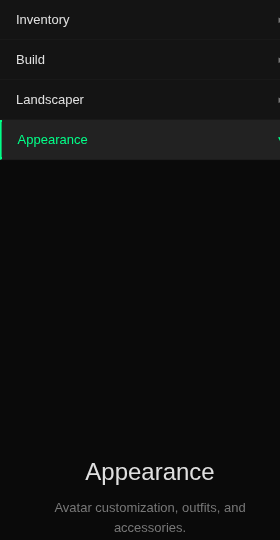
Cosmetic customization — outfits, accessories, and avatar shape — is on the roadmap but is not yet available. The Appearance shelf in the side menu surfaces a Coming Soon placeholder; clicking it expands the section but no controls render. For now, what you wear in the world is driven entirely by what you equip from the Worn tab above.
Performance
All equipment models are optimized for web performance. Each prop sits between 500 and 1,500 polygons and weighs under 250 kilobytes, with animations retargeted through the BlackBox Animator from sources like Mixamo and VRoid rigs. This keeps the world running smoothly even when dozens of fully-equipped players share the same space.
You do not need to worry about performance when equipping gear. The budget is managed on our end so you can focus on looking the way you want.
Press I to open the inventory panel. From there you can browse your items, equip and unequip gear, and inspect weapon details including attribute bonuses and material quality.