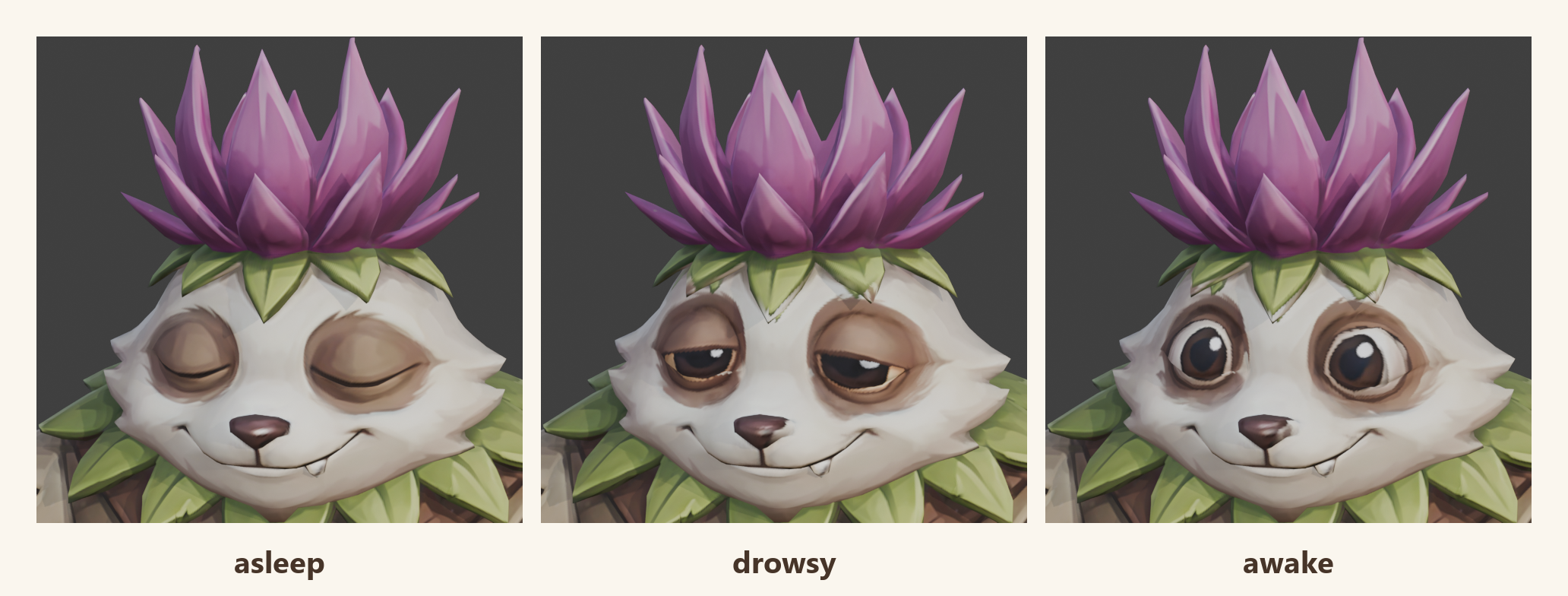
The first adventure in pOqpOq is The Lantern Thieves. Little thistle critters called Bramblings have been nibbling the glow-seeds out of the plaza's old lantern, and you help get them back. One of the seeds sits next to a Brambling that is fast asleep. You can tiptoe past it, or wake it and fight. The fox's advice: "Shh, that one's napping. Tiptoe, or wake it. Your call."
For that choice to mean anything, you have to be able to see the guard waking up. A critter that is asleep one moment and attacking the next, with nothing in between, doesn't give you a chance to back off. So I wanted three moods: asleep while you're far away, drowsy as you get close (the "careful…" moment), and wide awake when it notices you.
Three critters that weren't the same critter
I generated the guard in Tripo three times, asking for the same character with a different face each time: eyes closed, eyes half open, eyes wide. They came back looking like one character. Under the hood, though, they are three separate models. Each has a slightly different shape, a different number of points in its surface, and its own way of wrapping its picture around itself.
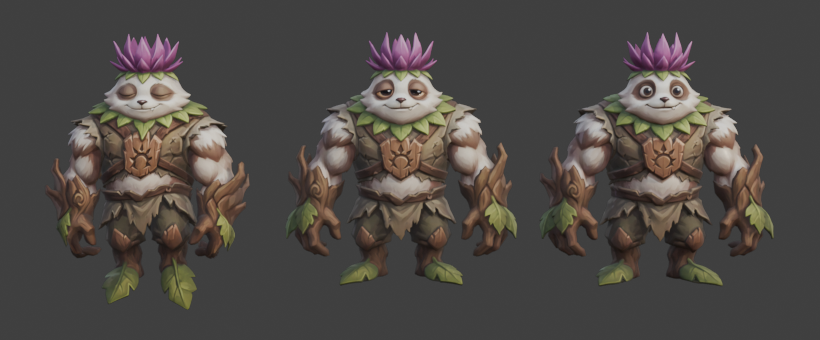
The obvious move is to swap the whole critter when it wakes up. That costs three bodies in memory, and you see the swap: a pop, with the pose jumping and the fur shifting. It's exactly the moment the player is watching most closely.
The trick: change the face, not the body
Every 3D character's skin is a flat picture, wrapped around it the way wrapping paper goes around a present. If the three moods could share one body and one wrapping, waking up would just mean changing the picture. There's no new body and no pop, and three small pictures cost very little. So the job became: get the drowsy face and the awake face painted onto the sleeping guard's own wrapping. It took four steps.
1. Line the heads up. The three heads were close but not in the same place: a few centimetres apart and about five percent different in size. A fitting pass slides and scales each head until it sits on the sleeper's, nudging it over and over until the surfaces match as closely as they can. They ended up within about 8 mm of each other, roughly a third of an inch on a head 40 cm across.
2. Project the faces across. With the heads overlapping, each spot on the sleeper's skin looks outward, finds the matching spot on the drowsy head, and copies its colour. Think of a slide projector shining the drowsy face onto the sleeper. Do that for every spot and you get a new wrapping that fits the sleeper's body exactly but shows the drowsy face. The same again gives the awake one. On the graphics card each projection took a few seconds.
3. Keep only the eyes. The projection copies everything, including the parts that differ for no good reason: a leaf a little to the left, a smile a touch wider, fur that clumps differently. So the new pictures are trimmed with a soft-edged oval around each eye. Inside the oval, the new eyes. Outside, the sleeper's original skin. The fur, crown, nose and smile are identical in all three moods, and the soft edge means there's no line where the old picture meets the new one.
4. Shrink for the web. Each mood picture ends up about 230 KB. All three together weigh less than a single photo off your phone.
Why I find this exciting
This is an early, plausible answer to a hard problem: giving generated characters a face that can change. It isn't lip-sync or a full face rig. It's a handful of moods a player can read from across a clearing, which is what a critter ten metres away actually needs. And it's a recipe, not a one-off. Generate the same character a few times with different expressions, line them up, project, trim. Any critter could get mood faces this way: sleepy, startled, cross, pleased.
It also opens a door I'm keen to walk through: eye tracking. Once the eyes live in their own little painted region, the pupils could slide around inside it, so a guard that has spotted you keeps its eyes on you as you move. That costs almost nothing, because the body never changes.
The limit is the shape underneath. This only works when the faces you're swapping between are close enough in shape. The sleeper's closed eyes were slightly sculpted, with a little bump of eyelid in the surface itself, and the open eyes are painted over that shape. Up close in the editor you can just about tell. At game distance, you can't. Push it to a face that changes shape a lot (a mouth opening wide, a squint that bunches the cheeks) and painting alone won't carry it. For a few moods on a critter, though, it's a solid start, and a cheap one.
A note on how it was made: I built this together with Claude, working in my own copy of Blender through its live connection. I watched the heads slide into place and the faces appear on the sleeper's body, step by step, and checked each result before the next. Start to finish it took one afternoon, most of it spent looking.
What's next
The faces are on their way into The Lantern Thieves: asleep while you're far away, drowsy as you near, awake the moment it spots you. We'll show the whole first quest in a video when it lands. After that, I want to blend between the pictures rather than switch, which opens the door to a slow wake-up, or even a blink, and then to eyes that follow you.
— Allen