Voice Chat & Community
Talk to the people you play with. Today, voice chat runs on the poqpoq community Discord server — one click from the Comms panel. Built-in spatial voice is where the platform is headed.
Text chat creates communities. Voice chat creates friendships. Right now, poqpoq World handles voice with a deliberately simple stopgap: the mic button in the Comms panel opens an invite to the poqpoq community Discord server in a popup, and you talk there while the game keeps running behind it. It is not fancy, but it works today.
The long-term plan is much better: the team has decided to build voice directly into the world itself, so you hear people from where they stand — no separate app at all. This page covers both: what works now, and where voice is headed.
Voice Chat Today: A Simple Stopgap
Joining voice takes one click. Here is the whole flow.
- Open Comms. Press T or click the chat icon to open the Comms panel.
- Click the 🎤 mic button in the Comms panel. The button is active while you are in Local chat — in other tabs its tooltip reads "Voice available in Local chat only". An invite to the poqpoq community Discord server opens in a small popup window. Your game keeps running behind it.
- Join a voice channel on the Discord server and start talking. Mute, unmute, and voice volume are all handled inside Discord.
That is the entire system today, and it is worth being clear about what it is not: there is no connection between where you are standing in-world and which channel you join. The mic button opens the same community server invite for everyone. If you want to talk with the people around you, agree on a channel and meet there — think of it as one big party line for the whole community rather than location-based voice.
Why Discord, Honestly
Discord is free, reliable, and most players already have it installed. Leaning on it as a stopgap means you can talk with other players today, while the team spends its building time on the things only poqpoq can build. It is a bridge, not the destination — when built-in voice ships, the Discord link goes away entirely.
In-World Sound Right Now
While voice lives on Discord for now, the world itself is not silent. Two kinds of in-world audio are fully built and working today.
Scripted Object Sounds
Objects can play sounds from scripts — a door that creaks, a bell that rings, a fountain that burbles. These sounds come from the objects themselves, so the soundscape of a place builds naturally out of the things around you.
Streaming Parcel Music
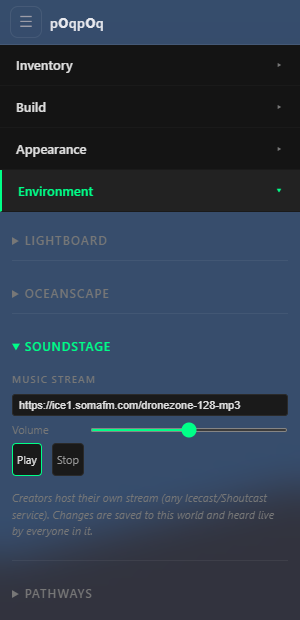
A world owner can set a music stream URL for their land — the classic internet-radio workflow, where a live DJ streams a set and everyone standing on the parcel hears it. Walk in, and the music is on. Owners set it up in the Soundstage section of the Environment panel. The controls are simple: a Music Stream URL field, a Volume slider that sets every visitor's baseline (each visitor's own Music slider scales from there), and Play / Stop buttons. One important note: Soundstage only takes effect in a world you own — in worlds you don't own, the controls do nothing.
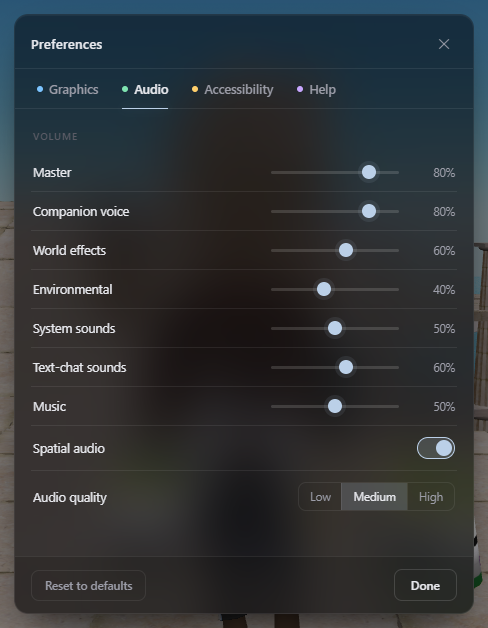
Your listening controls live in one place: Settings → Audio (the gear icon). Seven independent volume sliders live there — Master, Companion voice, World effects, Environmental, System sounds, Text-chat sounds, and Music — plus a Spatial audio toggle and an audio quality setting (Low/Medium/High). Together they cover every sound source in the world. Mono audio and captions live on the Accessibility tab of the same dialog.
Starter Streams for Your Soundstage
Any public MP3/AAC stream URL works. These stations are free, publicly streamable, and verified working — paste one into Soundstage and your world has music. (They are independent broadcasters; if you love one, support it.)
| Station | Vibe | Stream URL |
|---|---|---|
| SomaFM Drone Zone | Ambient space drones — built for atmospheres | https://ice1.somafm.com/dronezone-128-mp3 |
| SomaFM Space Station | Mid-tempo electronica | https://ice1.somafm.com/spacestation-128-mp3 |
| SomaFM Underground 80s | Synthpop & new wave | https://ice1.somafm.com/u80s-128-mp3 |
| SomaFM Secret Agent | Spy-lounge cool — parties and clubs | https://ice1.somafm.com/secretagent-128-mp3 |
| SomaFM Lush | Mellow vocal chillout | https://ice1.somafm.com/lush-128-mp3 |
| Radio Paradise (Main) | Eclectic rock, world & electronica | https://stream.radioparadise.com/mp3-192 |
| Radio Paradise Mellow | Softer companion channel | https://stream.radioparadise.com/mellow-192 |
| KEXP Seattle | Live indie radio (AAC stream) | https://kexp.streamguys1.com/kexp160.aac |
All in-world volume lives in one place: Preferences → Audio. That tab is the single authority for how loud everything is. If you are a creator and want to add sound or media to your own builds, see the Media on Prims guide in the Creator Guide.
Where Voice Is Headed: Built-In Spatial Voice
The team has formally decided the direction: voice chat built directly into poqpoq World, replacing Discord entirely. To be clear, this is where the platform is headed — it is not available yet, and there is no promised date. But the design is settled, and here is what it will feel like.
Voices Come From People
Each speaker becomes a positioned sound source in the same 3D audio space as object sounds and music. Someone chatting across the plaza sounds far away; as they walk toward you, their voice grows closer and louder — like standing in a real room.
One Volume Control
Voice joins the same audio graph as everything else, so Preferences → Audio stays the single place to set how loud things are — voices, music, and effects together.
Your Mute List Follows
Muting someone in poqpoq World will silence their voice too. One mute list, applied everywhere — text and voice alike.
No Third-Party App
No popup, no invite link, no separate account. When built-in voice launches, the Discord invite is retired for good. The team is evaluating the underlying technology — LiveKit is the lead candidate — with a bandwidth-and-cost test before committing to the build-out.