Rooms & Clusters
Group adjacent cells into named rooms. Shared walls open, cluster holds together.
What Is a Room?
A room in DM is a named, typed group of 2–6 adjacent cells that should feel like one space. Making rooms is a design-time operation — it's how you say “these four cells form the Boss Arena” without having to manually edit every wall between them.
When you create a room, DM does three things automatically:
- Opens the shared walls between member cells (all set to OPEN state).
- Assigns a
partOfRoomID to each member cell. - Registers the room in the Room List panel with its type badge.
Everything else — outer walls, content, theme — you still edit per-cell. The room is a grouping, not a replacement for cell-level control.
Creating a Room
- Switch to Select mode Press SPACE until the mode label reads Select. Click is now cell-pick.
- Ctrl+click 2 to 6 adjacent cells Hold Ctrl and click each cell you want in the room. Selected cells highlight. The selection must be contiguous — every cell must touch at least one other cell in the selection (BFS check). Non-contiguous selections disable the Create Room button.
-
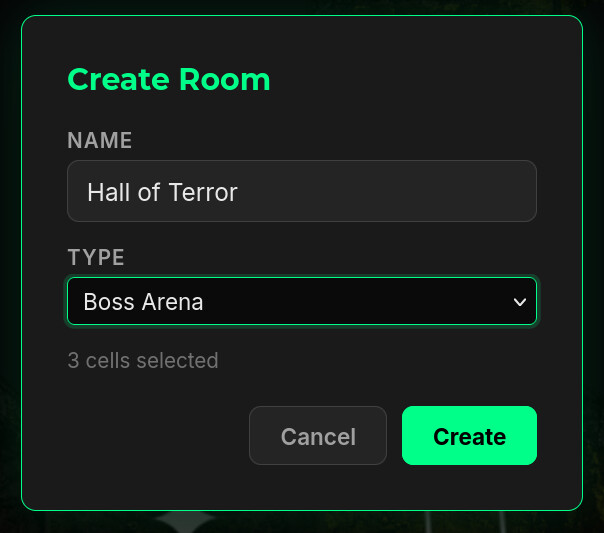
Click “Create Room”
Button appears in the properties panel once a valid multi-selection exists. Clicking opens a native HTML
<dialog>centered on screen with a green border and glow. -
Name and type the room
The dialog has two fields:
- Name (text input) — your label. "Chapel", "Boss Arena", "Trapped Hallway".
- Type (dropdown) — Custom, Boss Arena, Treasury, or Shrine Complex. The type drives default theme, default cell types, and any content rules (e.g. Treasury bumps the Creative axis; Boss Arena bumps Physical).
- Confirm Click Create or press Enter in the name field. DM validates (cells contiguous, active, not already in another room), opens the shared walls, and the room appears in the Room List.
The Rooms Panel
The Rooms panel (right sidebar, below Properties) shows every room in the current dungeon layer:
- Header shows a green count badge — total rooms in the layer
- Each room: name (bold), cell count, and type badge (e.g. BOSS)
- A Dissolve button per room — removes the room, reverts
partOfRoomto null on member cells, and resets the previously-auto-opened shared walls to SOLID - The + Create Room button sits at the bottom and is live when 2–6 adjacent cells are selected (shows the count: "+ Create Room (3 cells)")
Rooms are scoped to a single dungeon layer. If your dungeon has multiple floors, each floor has its own Rooms panel.
![Properties panel showing a selected octagon cell at [6,14] with Type/Theme/Floor/Difficulty fields; Rooms panel below with '+ Create Room (3 cells)' button ready; Publish panel at bottom with Export .bbd.](images/screenshots/properties-rooms-publish.jpg)
Room Types
Eight preset types, surfaced both in the Room Types panel on the left sidebar and in the TYPE dropdown of the Create Room dialog. Each has a distinctive color badge that carries through to the minimap.
| Type | Badge | Intent | Compass Bias |
|---|---|---|---|
| Entrance | ■ green | Spawn point for the player. Safe zone — no enemies or traps. | None |
| Cave / Cavern | ■ green | Natural, irregular space. Pairs with Cave or Mushroom Grotto cell types. | Creative |
| Chamber / Hall | ■ olive | Constructed space with structure. Pairs with Chamber or Pillared Hall. | Creative / Physical |
| Vault / Treasure | ■ gold | Reward centerpiece. Often paired with an ornate chest or pedestal. | Creative / Social |
| Boss Arena | ■ orange | The big encounter. Stage a mini-boss or boss fight here. | Physical |
| Shrine | ■ orange | Narrative pause, safe. No enemies or traps. Pairs with altar props. | Creative |
| Trap Room | ■ red | Hazard-focused. Multiple trap placements in a single space. | Mental |
| Crystal / Arcane | ■ pink | Magical or crystalline theme. Pairs with Crystal Cave cells. | Mental / Creative |
The left-sidebar Room Types panel also serves as a quick-reference legend — when you glance at the minimap, the room badges match the dot colors.
Room metadata (the name, the type badge, the cluster grouping) is not persisted to the .bbd file. What is persisted: the wall state changes the room caused (opened shared walls), the partOfRoom tag on each cell, and of course any content you placed inside. The Room List is scaffolding — useful while you're building, but the dungeon's geometry and content carry its meaning once saved.
Contiguity — What Counts as Adjacent?
A selection is contiguous if every selected cell shares an edge with at least one other selected cell. For octagons, that means:
- Cardinal neighbor (long edge) counts — two octagons joined N/E/S/W are adjacent.
- Diagonal via connector counts if you also include the connector diamond — octagon, connector, octagon, all three selected.
- Pure diagonal (octagon at (0,0) and (2,2), no connector at (1,1) selected) does not count. The connector between them must be part of the selection.
Dissolving a Room
Click Dissolve in the Room List. The room evaporates: partOfRoom clears on every member cell, the walls that were opened by the room creation revert to SOLID (walls you opened manually stay open — only the auto-opens revert), and the entry disappears from the list. Content stays where it was.