Physics & Land Impact
Every object you place has a physics type that controls how it interacts with avatars and the world. A budget system keeps scenes running smoothly for everyone.
When you place an object, the system assigns it a physics type automatically based on the shape you chose. A wall blocks movement. A platform lets you walk on it. A decorative plant lets you pass right through. Most of the time, the defaults are exactly right.
When you need something different -- a crate that can be pushed, or a fence that blocks avatars but not the camera -- the Phys tab in the Build Panel gives you full control.
The Four Physics Types
Every object in poqpoq World falls into one of four physics categories. These are presented as visual cards in the Phys tab, each with a clear description of what it does.
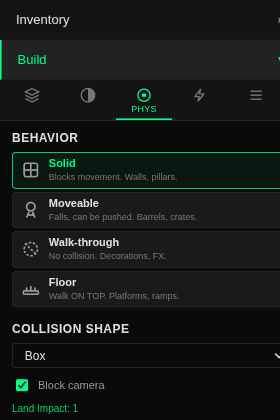
Solid
Blocks movement and camera. Avatars cannot walk through it. The camera bumps off it instead of clipping inside.
Use for: walls, pillars, fences, furniture, boulders -- anything that should feel physically present in the world.
Moveable
Falls with gravity and can be pushed. Moveable objects respond to physical forces. They cost more Land Impact than static objects because the world has to track their position continuously.
Use for: barrels, crates, bouncing balls, loose debris -- anything a player should be able to interact with physically.
Walk-through
No collision at all. Avatars and camera pass right through it. The object is visible but has no physical presence.
Use for: decorations, particle effects, holograms, trigger zones, signage -- anything that should look present without blocking movement.
Floor
Avatars can walk on top of it. This is like Solid, but the object is also registered as a walking surface. Avatars standing on it will follow its height, just like standing on terrain.
Use for: platforms, ramps, bridges, elevated walkways, stairs -- any surface you want people to stand or walk on.
Smart Defaults
You usually do not need to set physics manually. When you place a shape, the system picks the most sensible physics type for you. Here is what each shape defaults to.
| Shape | Default Type | Why |
|---|---|---|
| Box | Solid | Walls, pillars, furniture -- most common use |
| Sphere | Solid | Decorative orbs, boulders |
| Cylinder | Solid | Columns, posts, barrels |
| Plane | Walk-through | Signs, posters, thin decor -- too thin to block |
| Platform | Floor | Built for walking on |
| Ramp | Floor | Built for walking up |
| Stairs | Floor | Built for climbing |
| Wall | Solid | Walls should block |
| Room | Solid | An enclosed space with walls |
| Chair, Table | Solid | Furniture should feel present |
You can always override the default by selecting a different type in the Phys tab after placing the object.
Camera Blocking
Solid objects block the camera by default, which means the camera will not clip through walls when you orbit around your avatar. This creates a more natural, immersive experience.
Floor objects (platforms, ramps) do not block the camera by default, since you often want the camera to follow the avatar over and under platforms without interference. You can toggle camera blocking on or off for any object in the Phys tab.
Land Impact
Land Impact (LI) is a budget system that keeps the world running smoothly. Every object you place has a Land Impact cost, and each creator has a maximum budget per world. This prevents any single builder from overloading a shared space with thousands of objects.
How Land Impact Is Calculated
An object's Land Impact depends on two things: its physics type and its size.
The general rules of thumb are:
Walk-through objects are cheapest. Use them for anything decorative that does not need to block movement.
Solid objects are the standard cost. Most builds are primarily Solid objects and they are efficient.
Floor objects cost a bit more. The extra cost reflects the world tracking them as ground surfaces.
Moveable objects are the most expensive. Use them intentionally rather than making everything moveable.
Bigger objects cost more than smaller ones. A huge wall costs more than a small brick, regardless of physics type.
The Budget Bar
The budget bar at the bottom of the Build Panel shows your current Land Impact usage at all times. It tracks both your personal budget and the overall world budget.

Figure 2. The budget bar in its empty-world state. LI turns green when there is plenty of headroom; Dyn tracks moveable objects; Obj is the raw count.
Plenty of room
Getting busy
Nearly full
If you try to place an object that would exceed your budget, the system will let you know and the object will not be created. You can free up budget by deleting objects you no longer need, or by switching expensive Moveable objects to cheaper Solid or Walk-through types.
Staying Efficient
Land Impact Tips
- Use Walk-through for pure decorations. If nobody needs to bump into it, there is no reason to make it Solid.
- Only use Moveable when you genuinely need objects to respond to physics. A barrel that just sits there should be Solid.
- Smaller objects cost less. Two small walls cost less than one giant wall covering the same area, but one large object is fewer draw calls. Balance size against count.
- The budget bar updates in real time as you place, delete, or change objects. Keep an eye on it as you build.
- Platforms, ramps, and stairs default to Floor, which costs more than Solid. If you have a platform that nobody walks on (like a high decorative shelf), switch it to Solid to save budget.
- When you are near the limit, review your build for objects that could be converted to Walk-through without affecting gameplay.
Advanced Collision
Behind the scenes, every physical object has two invisible properties that determine how it behaves: its density (how heavy it is for its size) and its collision shape (the simplified outline the physics engine uses to detect bumps and contacts).
Density and Mass
Objects in poqpoq World have a material density, just like real-world materials. A wooden crate is lighter than a stone block of the same size, and a metal beam is heavier than both. The system calculates mass automatically from the object's density and its volume -- so when you resize something, its mass changes to match.
This means physics feel natural without you having to think about it. A small wooden box gets nudged easily, while a large stone wall barely moves when pushed. When you choose a material preset in the Phys tab, density is set for you.
| Material | Feel | Typical Use |
|---|---|---|
| Wood | Light, moderate grip | Crates, furniture, fences |
| Stone | Heavy, high grip | Walls, pillars, boulders |
| Metal | Very heavy, smooth | Beams, machinery, railings |
| Rubber | Medium weight, very bouncy | Balls, bumpers, tires |
| Ice | Medium weight, extremely slippery | Frozen surfaces, sliding puzzles |
| Glass | Heavy, smooth, fragile feel | Windows, display cases |
The key insight: mass scales with size. A 1-meter wooden box is easy to push. A 10-meter wooden box is a hundred times heavier and barely budges. You do not need to set mass manually -- just pick a material and size your object.
Collision Shapes
When the physics engine checks whether two objects are touching, it does not use the object's full 3D model -- that would be far too slow. Instead, it uses a simplified collision shape that approximates the object's outline. There are three main types, each with different trade-offs.
Box
Fastest, roughest fit. The collision shape is a simple rectangular box that encloses the entire object. Very fast for the physics engine to calculate, but it includes empty space around irregular shapes.
Best for: simple furniture, walls, crates, platforms -- anything that is already roughly box-shaped.
Convex Hull
Good balance of speed and accuracy. The collision shape wraps tightly around the object's outer surface, like shrink-wrap around a package. It follows the object's silhouette much more closely than a box, but it cannot represent concave details like hollows or doorways.
Best for: most imported 3D models, sculptures, vehicles, organic shapes -- the default for imported GLB objects.
Triangle Mesh
Exact shape, most expensive. The collision shape matches the object's 3D model exactly, including concave areas like archways, room interiors, and winding staircases. This is the most accurate option but costs significantly more for the physics engine to process.
Best for: complex architectural pieces with walkable interiors, terrain-like objects, and detailed structures where avatars need to walk through arches or inside rooms. Only available for objects that do not move.
Choosing the Right Collision Shape
- Start with Box for simple objects. If avatars are getting stuck on invisible edges, try switching to Convex Hull.
- Convex Hull is the best default for most imported 3D models. It wraps tightly without being expensive.
- Only use Triangle Mesh when you need avatars to walk through concave spaces like doorways, arches, or interior rooms. It cannot be used on moveable objects.
- A chair with a Box collision shape has an invisible wall between its legs. Switching to Convex Hull tightens the fit. If you need avatars to walk between the legs, Triangle Mesh is the answer -- but consider whether that level of detail matters for your build.
- Simpler collision shapes are not just faster -- they also cost less Land Impact. Triangle Mesh objects use more budget than the same object with a Box shape.